How can I create an FTP account in cPanel?

 
Setting up FTP access is the most secure way to manage files in specific folders on your server without exposing the global security of your hosting. Follow these steps to enable it in minutes:
 

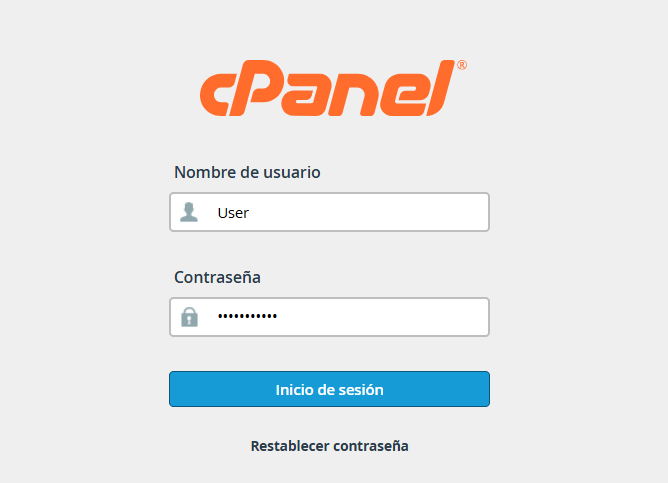
1. Log in to your cPanel.


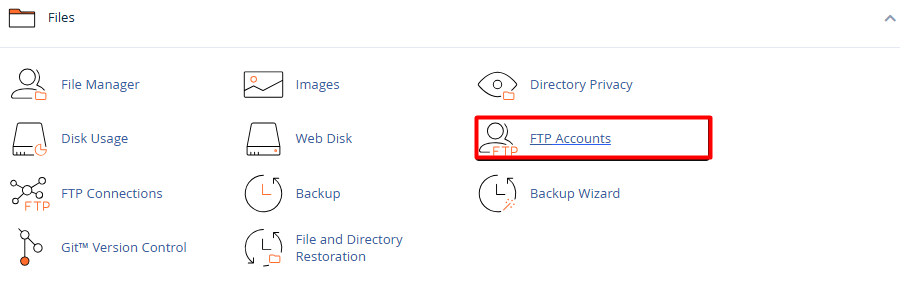
2. Go to the Files section and select the FTP Accounts icon.


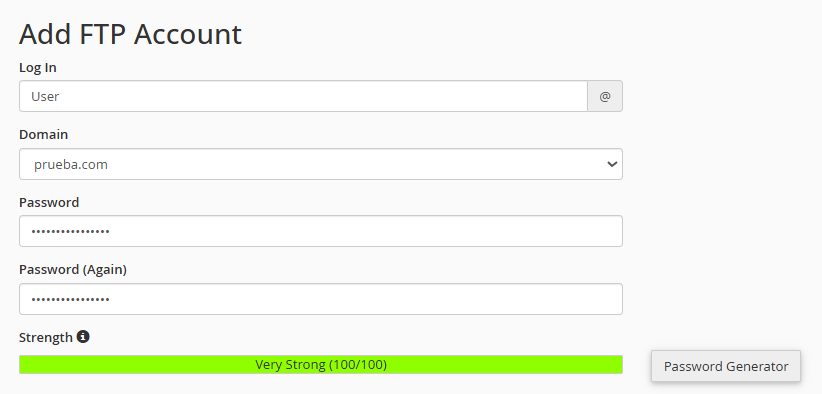
3. Configure the credentials: In the Add FTP Account form, complete the following information:


3.1. Login: Define the name (example, collaborator). Your final account will be user@yourdomain.com.


3.2. Domain: Select the corresponding domain if you manage multiple sites.


3.3. Security: Enter a strong password or use the built-in Password Generator.


4. Define permissions and limits: Directory (Path) – Key point! Determine which folder the user will have access to.


4.1. For full access: public_html.


4.2. For a specific folder: public_html/folder-name.


4.3. Quota: Assign the space limit in megabytes (MB) or select Unlimited according to your needs.



5. Click Create FTP Account. The new access will immediately appear in the list below, where you can obtain the configuration data for clients like FileZilla or edit the password in the future.

  • 1 Users Found This Useful
Was this answer helpful?

Related Articles

How can I connect to my cPanel via FTP using WinSCP?

  Connecting your website with WinSCP is a quick and secure process. Follow these three steps to...

How do I upload files using the File Manager?

  Uploading your documents to the platform is a quick and simple process. Follow these steps to...

How to create, edit, and delete files in cPanel?

  Managing files through a File Manager (commonly used in control panels like cPanel) is a...

How can I manage file and folder permissions in cPanel?

  Managing file security is a straightforward process that can be performed directly from the...

What is the File Manager in cPanel and what can I do with it?

  The File Manager is a fundamental tool within the cPanel interface that allows you to manage...